
본문으로 건너뛰기

장3선형 변환과 행렬 대수

핵심 목표

선형 변환과 선형 변환이 행렬과 맺는 관계를 배웁니다.

실제로는 변환, 즉 입력을 받아 출력을 내놓는 함수의 기하에 관한 질문을 던지게 되는 경우가 많습니다. 변환을 행렬로 나타낼 수 있다면 이러한 질문에는 선형대수로 답할 수 있습니다.

예제

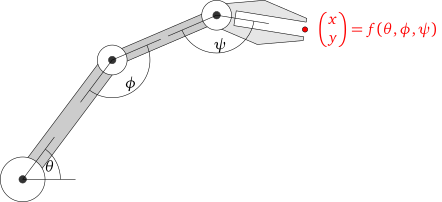
다음 그림과 같이 손을 평면 위에서 움직일 수 있는 관절 세 개짜리 로봇 팔을 만든다고 가정합시다.
\usetikzlibrary{ipe}
\usetikzlibrary{angles}
\tikzstyle{ipe stylesheet} = [
  ipe import,
  even odd rule,
  line join=round,
  line cap=butt,
  ipe pen normal/.style={line width=0.4},
  ipe pen heavier/.style={line width=0.8},
  ipe pen fat/.style={line width=1.2},
  ipe pen ultrafat/.style={line width=2},
  ipe pen normal,
  ipe mark normal/.style={ipe mark scale=3},
  ipe mark large/.style={ipe mark scale=5},
  ipe mark small/.style={ipe mark scale=2},
  ipe mark tiny/.style={ipe mark scale=1.1},
  ipe mark normal,
  /pgf/arrow keys/.cd,
  ipe arrow normal/.style={scale=7},
  ipe arrow large/.style={scale=10},
  ipe arrow small/.style={scale=5},
  ipe arrow tiny/.style={scale=3},
  ipe arrow normal,
  /tikz/.cd,
  ipe arrows, % update arrows
  <->/.tip = ipe normal,
  ipe dash normal/.style={dash pattern=},
  ipe dash dashed/.style={dash pattern=on 4bp off 4bp},
  ipe dash dotted/.style={dash pattern=on 1bp off 3bp},
  ipe dash dash dotted/.style={dash pattern=on 4bp off 2bp on 1bp off 2bp},
  ipe dash dash dot dotted/.style={dash pattern=on 4bp off 2bp on 1bp off 2bp on 1bp off 2bp},
  ipe dash normal,
  ipe node/.append style={font=\normalsize},
  ipe stretch normal/.style={ipe node stretch=1},
  ipe stretch normal,
  ipe opacity 10/.style={opacity=0.1},
  ipe opacity 30/.style={opacity=0.3},
  ipe opacity 50/.style={opacity=0.5},
  ipe opacity 75/.style={opacity=0.75},
  ipe opacity opaque/.style={opacity=1},
  ipe opacity opaque,
]
\begin{tikzpicture}[ipe stylesheet, scale=.7]
  \draw[fill=white!80!black]
    (100, 528) -- (196, 656) -- (220, 656) -- (124, 528) -- cycle;
  \draw[fill=white!80!black]
    (208, 664) -- (320, 712) -- (320, 696) -- (208, 648) -- cycle;
  \begin{scope}[shift={(321.91, 715.847)}, rotate=-9.1623]
  \draw[fill=white!90!black]
    (0, 0)
     -- (48, 12)
     -- (96, 0)
     -- (96, -4)
     -- (20, -4)
     -- (20, -20)
     -- (96, -20)
     -- (96, -24)
     -- (48, -36)
     -- (0, -24) -- cycle;
  \draw[fill=red] (96, -12) circle[radius=1mm]
     node[right=2mm, red] {$\vec{x y} = f(\theta,\phi,\psi)$};
  \end{scope}
  \filldraw[fill=white]
    (208, 656) circle[radius=16];
  \filldraw[fill=white]
    (320, 704) circle[radius=16];
  \filldraw[fill=white]
    (112, 528) circle[radius=24];
  \filldraw[white!20!black]
    (112, 528) circle[radius=4]
    (208, 656) circle[radius=4]
    (320, 704) circle[radius=4];
  \coordinate (c1) at (112, 528);
  \coordinate (c2) at (208, 656);
  \coordinate (c3) at (320, 704);
  \coordinate (x1) at ($(c1) + (2cm,0)$);
  \coordinate (x3) at ($(c3) + (2cm,0)$);

  \draw (c1) -- (x1);
  \draw (c1) -- ($(c1)!2cm!(c2)$);
  \pic[draw, "$\theta$", angle radius=1cm, angle eccentricity=.8] {angle=x1--c1--c2};

  \draw (c2) -- ($(c2)!2cm!(c1)$);
  \draw (c2) -- ($(c2)!2cm!(c3)$);
  \pic[draw, "$\phi$", angle radius=1cm, angle eccentricity=.8] {angle=c1--c2--c3};

  \coordinate (x3p) at ($(c3)!2cm!-9.1623:(x3)$);
  \draw (c3) -- ($(c3)!2cm!(c2)$);
  \draw (c3) -- (x3p);
  \pic[draw, "$\psi$", angle radius=1cm, angle eccentricity=.8] {angle=c2--c3--x3p};

\end{tikzpicture}

변환 f를 다음과 같이 정의합니다: f(\theta,\phi,\psi)는 관절들을 각각 각도 \theta, \phi, \psi만큼 회전시켰을 때 손의 (x,y) 위치입니다. f의 출력은 관절들을 주어진 입력 각도로 맞추었을 때 손이 평면 위의 어디에 있을지를 알려 줍니다.

안타깝게도 이러한 함수는 행렬에서 나오지 않으므로, 이 함수에 관한 질문에 답하는 데 선형대수를 사용할 수 없습니다. 사실 이러한 함수는 꽤 복잡하며, 이를 연구하는 것이 역기구학의 주제입니다.

이 장에서는 행렬과 변환 사이의 관계를 다룹니다. 절 3.1에서는 방정식 b = Ax를 독립변수가 x이고 종속변수가 b인 함수로 보고, 그에 맞게 그림을 그립니다. 변환을 추상적으로 연구하고, 변환이 일대일인지 그리고/또는 전사인지와 같은 질문을 던지는 데 얼마간 시간을 들입니다(절 3.2). 절 3.3에서는 “변환을 정확히 언제 행렬로 나타낼 수 있는가?”라는 질문에 답합니다. 이어서 행렬 곱셈을 변환의 합성의 특수한 경우로 제시합니다(절 3.4). 이는 행렬 대수, 즉 수 대신 행렬을 가지고 어느 정도까지 산술을 할 수 있는지에 관한 연구로 이어집니다. 이를 바탕으로 절 3.5에서는 행렬로 나누어 행렬 방정식을 푸는 법을 배웁니다.